


|
|
|
|
|
|
|
|
|
version 2004 (Modified)
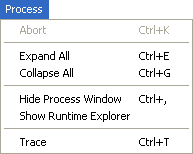
Abort
Warning: The Abort menu command is provided only for administration and debugging purposes. You should use it only when a client cannot terminate a process by itself.
The effect of the Abort command depends on the type of the process currently selected in the administration window:
• If a connection process is selected, this command aborts the process.
• If a User list is selected, this command aborts all processes belonging to this user and then removes the user from the list. This automatically disconnects the user from the server.
• If a stored procedure is selected, this command aborts the stored procedure.
• If the Stored Procedures list is selected, this command aborts all the stored procedures.
• If a Web connection process is selected, this command aborts the Web connection process.
• If the Web Clients list is selected, this command aborts all the Web connection processes.
You can abort all processes except the kernel processes. If a kernel process is selected, the Abort command is disabled.
If you attempt to use an aborted process on a 4D client machine, a warning message informs you that the process is no longer available. For example, the following alert is displayed when the Abort command has been applied to a user:
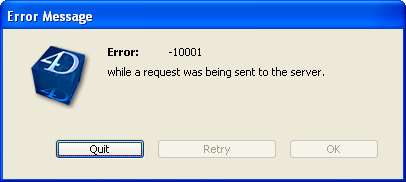
Error -10001, The actual connection to the database has been disrupted.
Note: Connection errors are listed in the section Network Errors of the 4D Language Reference manual.
If a workstation accidentally ends its connection to the server, it takes the server a few seconds to determine that the client has unexpectedly exited. The server then performs the following:
• Unlocks any locked records
• Cancels any transactions not yet canceled or validated
• Aborts any client processes
• Removes the user from the list of users in the 4D Server administration window
Consequently, you do not need to apply the Abort command to the user; 4D Server automatically cleans up the user list for you.
Expand All/Collapse All
These commands allow you to either expand or collapse processes for all users listed in the administration window.
Hide Process Window/Show Process Window
This command allows you to hide or show the 4D Server administration window.
Show Runtime Explorer/Hide Runtime Explorer
This command allows you to hide or show the 4D Server Runtime Explorer window.
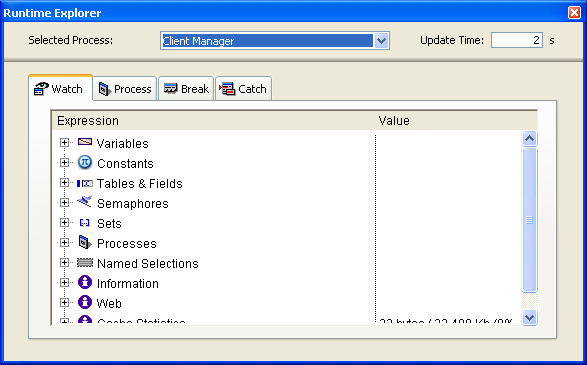
The Runtime Explorer enables you to view the status of the database various structural elements and to check that the available resources are correctly managed. The Runtime Explorer is particularly useful while developing or analyzing a database.
The Runtime Explorer window contains four pages that can be accessed by clicking on the following tabs: Watch, Process, Break and Catch. The Runtime Explorer works the same way in 4D Server and 4th Dimension. For more information, please refer to the 4th Dimension Design Mode manual.
Trace
The Trace command can be applied to the following processes:
• Connection process for tracing Triggers executing within the context of that process
• Web connection process for tracing the code executed on the server machine in response to the requests sent by the Web browser
• Stored Procedure for tracing the project method executed as stored procedure.
Choosing the Trace command displays a Debugger window for the selected process as soon as this process starts executing code. You can also display the Debugger window for a process by calling the TRACE command from within a method executing in that process (see screen shot below).
The interesting point here is that 4D Server "memorizes" the Trace request:
• If the process is currently executing code, the Debugger immediately appears for that process.
• If the process is not currently executing code (i.e., the process is waiting for an event in data entry mode), the Debugger will appear right after the process resumes executing the code.
For additional information about the Trace command, refer to the 4th Dimension Language Reference manual.
See Also
Data Menu, Edit Menu, File Menu, Help Menu, Web Server Menu.
|
|
|
|
|
|
|
|
|