


|
|
|
|
|
|
|
|
|
version 2004 (Modified)
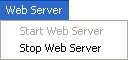
This menu lets you start and stop the 4D Web server at any time.
Note: Under Mac OS, this menu may not work if the Web server is started using a temporary root session (see the Web server configuration and connection management section in the 4th Dimension Language Reference manual).
The 4D Web Server can be started in three different ways:
• Using the Web Server menu from the menu bar of 4D Server or the Run menu of 4D Client. These menus allow you to start and stop the Web server at your convenience.
• Automatically, by publishing the database each time it is opened. The Publish Database at Startup option on the "Web>Configuration" page of the application Preferences should be checked. Once this is done, the database will be published on the Web automatically each time you open it with 4th Dimension or 4D Server.
• Programmatically, by calling the command START WEB SERVER.
See Also
Data Menu, Edit Menu, File Menu, Help Menu, Process Menu, Web server configuration and connection management, Web Server, Overview.
|
|
|
|
|
|
|
|
|