


|
|
|
|
|
|
|
|
|
version 2004 (Modified)
When you launch 4D Client, you are presented with a Connection dialog box containing three tabs.
"Recent" tab
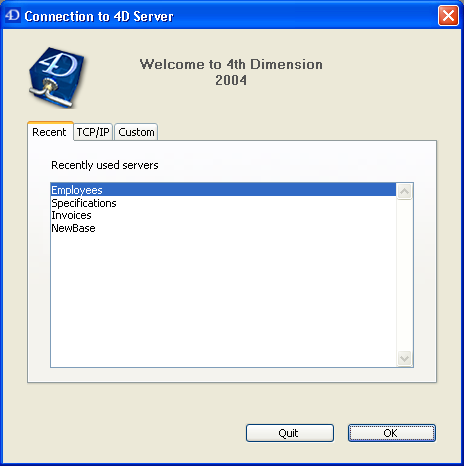
The Recent page memorizes the list of all 4D servers recently used. The list is sorted by alphabetical order. To connect to a server from this list, double-click on its name or select it and click the OK button.
To remove a server from the list, select it and hold down the Del or Backspace key.
"TCP/IP" tab
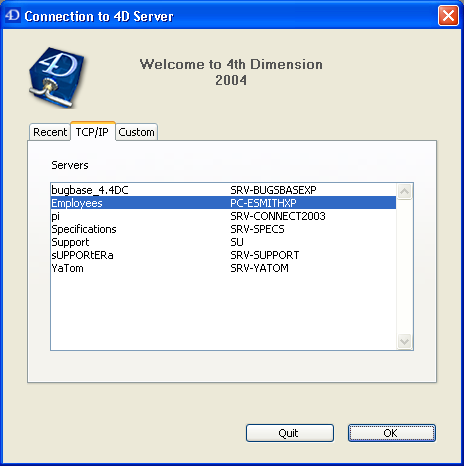
4D Server includes a built-in TCP/IP broadcasting system that publishes by default the name of the 4D Server databases published over the network. These names are listed on the TCP/IP Page of the connection dialog box.
The list is sorted by alphabetical order. To connect to a server from this list, double-click on its name or select it and click the OK button.
Notes:
• A circumflex accent (^) is placed before the name of databases published with the encryption option. For more information, refer to section Encrypting Client/Server Connections.
• It is possible to prohibit dynamic publication of the database name on the network (see the Publishing preferences section). In this case, the connection must be carried out manually on the "Custom" page.
"Custom" tab
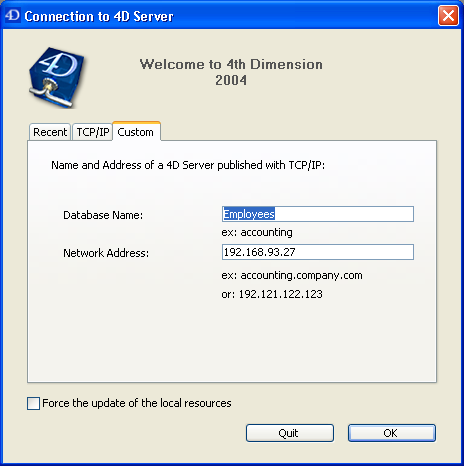
The Custom page allows assigning a published server on the network using its IP address and attributing it a customized name.
You can customize the 4D Server TCP/IP broadcasting system so that the names of server databases are not automatically published over the network (see the Publishing preferences section). In this case, the names do not appear in the TCP/IP page on the client side. However, if you know the IP address of a server database whose name is not broadcast, you can manually enter its IP address.
• Database name: allows defining the name of the 4D Server database. This name will be used in the Recent page when referring to the database.
• Network address: allows entering the IP address of the machine where the 4D Server was launched. If two servers are executed simultaneously on the same machine, the IP address must be followed a colon and port number, for example: 192.168.92.104:19814.
By default, the publishing port of a 4D Server is 19813. This number can be modified in the application Preferences (see the Configuration preferences section).
Note: If a database was selected in the Recent or TCP/IP pages at the moment that you clicked on the Custom tab, the two fields display the corresponding information.
Once this page assigns a server, click the OK button will allow you to connect to the server. The server will then be listed in the Recent page.
Note: If the database is published using the encryption option, you must add a circumflex accent (^) before the name; otherwise the connection will be refused. For more information, refer to section Encrypting Client/Server Connections.
Force the update of the local resources
This option causes systematic updating of the local resources on the client machine when it connects. The local resources are the structural information related to the database that are stored on each client machine.
As a rule, updating of the local resources is automatic when the structure of the database has been modified between two connections. Most of the time, this option is unnecessary. Nevertheless, in certain specific cases, it may be necessary to force the update.
This option can also be set on the server machine; in this case, it will apply to all the client machines. For more information, refer to the Creating a New 4D Server Database section.
|
|
|
|
|
|
|
|
|