


|
|
|
|
|
|
|
|
|
version 2004 (Modified)
You can set parameters concerning the security and publishing of databases by 4D Server on the "Publishing" page of the Client-Server theme in the application Preferences (accessible on both 4D Client and 4D Server):
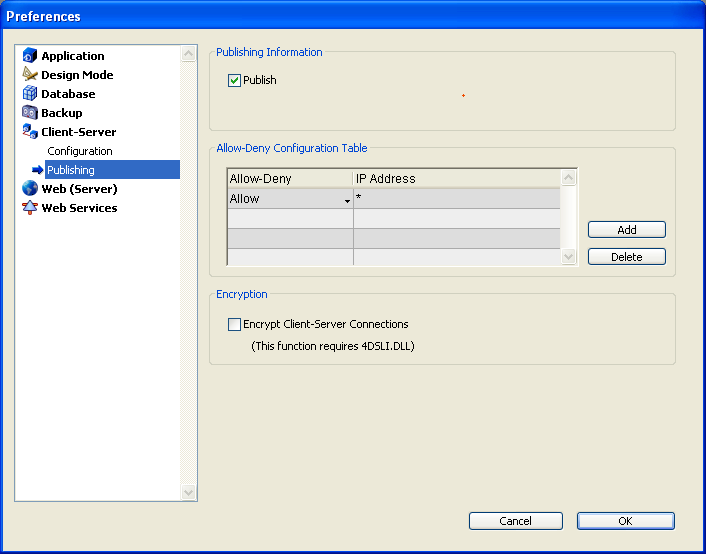
These parameters are detailed in this section.
Publish
This option lets you indicate whether or not the 4D Server database will appear in the list of published databases.
• When this option is checked (default option), the database is made public and appears in the list of published databases (TCP/IP page).
• When the option is not checked, the database is not made public and it does not appear in the list of published databases. To connect, users must manually enter the address of the database on the Custom page of the connection dialog box.
Allow-Deny Configuration Table
This table allows you to set access control rules for the database depending on 4D Client machine IP addresses. This option allows reinforcing security, for example, for strategic applications.
Note: This configuration table does not control Web connections.
The behavior of the configuration table is as follows:
• The "Allow-Deny" column allows selecting the type of rule to apply (Allow or Deny) using a pop-up menu. To add a rule, click on the Add button. A new row appears in the table. The Delete button lets you remove the current row.
• The "IP Address" column allows setting the IP address(es) concerned by the rule. To specify an address, click in the column and enter the address in the following form: 123.45.67.89.
You can use an * (asterisk) character to specify "starts with" type addresses. For example, 192.168.* indicates all addresses starting with 192.168.
• The application of rules is based on the display order of the table. If two rules are contradictory, priority is given to the rule located highest in the table.
You can re-order rows by modifying the current sort (click the header of the column to alternate the direction of the sort). You can also move rows using drag and drop.
• For security reasons, only addresses that actually match a rule will be allowed to connect.
In other words, if the table only contains one or more Deny rules, all addresses will be refused because none will match at least one rule. If you want to deny only certain addresses (and allow others), add an Allow * rule at the end of the table. For example:
- Deny 192.168.* (deny all addresses beginning with 192.168)
- Allow * (but allow all other addresses)
By default, no connection restrictions are applied by 4D Server: the first row of the table contains the Allow label and the * (all addresses) character.
Encrypt Client-Server Connections
This option lets you activate the SSL mode (secured mode) for communications between the server machine and the 4D Client machines. This option is detailed in the Encrypting Client/Server Connections.
See Also
Configuration preferences, Encrypting Client/Server Connections.
|
|
|
|
|
|
|
|
|