


|
|
|
|
|
|
|
|
|
version 2004.1 (Modified)
You can set various parameters concerning the network and the client-server communication on the "Configuration" page of the Client-Server theme in the application Preferences (accessible on both 4D Client and 4D Server):
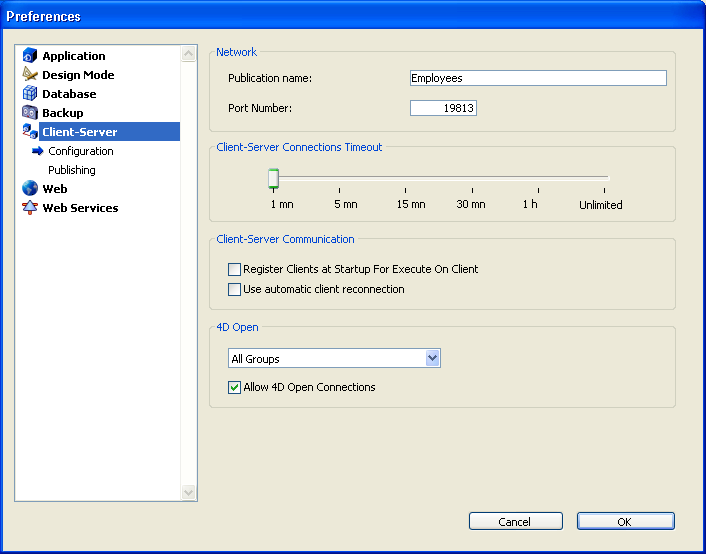
These parameters are detailed in this section.
Publication name
This option lets you change the publication name for a database published by 4D Server, i.e., the name displayed on the dynamic TCP/IP publication page of the connection dialog box (see the Connecting to a 4D Server Database section).
By default, 4D Server uses the name of the database structure file. You can enter any custom name you want.
Note: This parameter is not taken into account in custom client-server applications. In theory, the client application connects directly to the server application, without passing by the connection dialog box. However, in the event of an error, this dialog box will appear; in this case, the publication name of the server application is the name of the compiled database.
Port Number
This option lets you change the TCP port number on which 4D Server publishes the database. This information is stored in the structure of the database and on each client machine. By default, the TCP port number used by 4D Server and 4D Client is 19813.
Customizing this value is necessary when you want to use several 4D applications on the same machine with the TCP protocol; in this case, you must specify a different port number for each application.
When you modify this value from 4D Server or 4D Client, it is automatically passed on to all the 4D Client machines connected to the database. To update any other client machines that are not connected, you just need to enter the new port number (preceded by a colon) after the IP address of the server machine on the Custom page of the connection dialog box at the time of the next connection. For example, if the new port number is 19888:
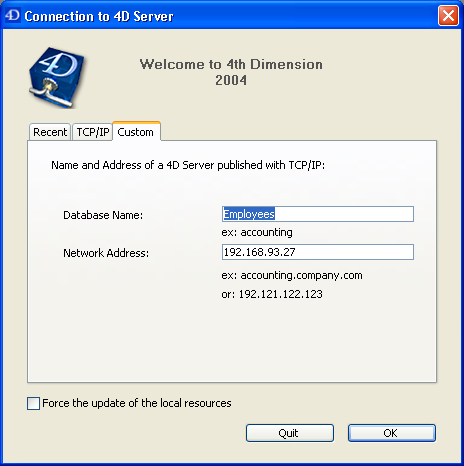
Note: Only databases published on the same port as the one set in 4D Client are visible on the TCP/IP dynamic publication page.
Client-Server Connections Timeout
This thermometer is used to set the timeout (period of inactivity beyond which the connection is closed) between 4D Server and the client machines connecting to it.
The Unlimited option removes the timeout. When this option is selected, client activity control is eliminated.
When a timeout is selected, the server will close the connection of a client if it does not receive any requests from the latter during the specified time limit.
Register Clients at Startup For Execute On Client
When this option is checked, all the 4D Client machines connecting to the database can execute methods remotely. This mechanism is detailed in the section Registering 4D Client.
Use automatic client reconnection
This low-level function allows, in some specific configurations, the automatic reconnection of client machines in the case of unexpected disconnection.
When the option (global for all client machines) is checked, the automatic client reconnection feature is used as soon as a client connection is lost. There is only one attempt: if the reconnection fails, an error -10002 is returned. If it is successful, an alert dialog box is displayed and a notification icon appears in the Windows task bar.
For the automatic client reconnection feature to be available, the server-side timeout must be set to a value higher than 1 minute.
4D Open
4D Open is the API (Application Programming Interface) that allows non-4D Client applications to connect to 4D Server.
• Allow 4D Open Connections: When it is checked, this option gives the group specified by the menu the possibility of connecting to 4D Server from a 4D Open application.
• 4D Open Access menu: This menu lets you specify the group of users allowed to connect to the 4D Server database via 4D Open, when the "Allow 4D Open Connections" option is checked.
Note: For security reasons, this option is unavailable on the server machine.
See Also
Publishing preferences, Registering 4D Client.
|
|
|
|
|
|
|
|
|