


|
|
|
|
|
|
|
|
|
version 2004 (Modified)
Stored procedures can be executed on one or several 4D Client. Stored procedures on client machines are executed the same as way as stored procedures on the server, except that on the client they can invoke data entry. Refer to the Stored Procedures section for further information.
Furthermore, any client machine executing stored procedures triggered by a server or another client machine, should explicitly be registered for this session. There are two methods to register 4D Client: 4D Client can automatically be registered when connecting or through programming.
Registering automatically each 4D Client connecting to 4D Server
The "Register Clients at Startup" check box is available in the application Preferences, on the "Configuration" page of the "Client-Server" theme:
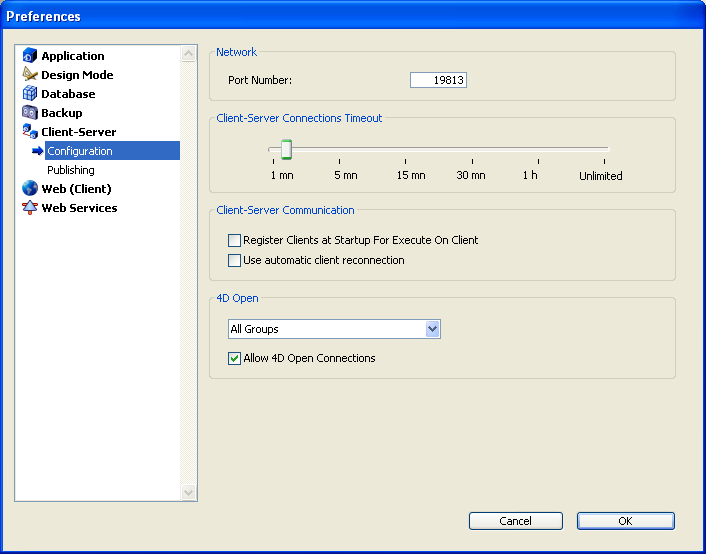
When this option is checked, each 4D Client connecting to the database is automatically referenced with 4D Server as being able to execute stored procedures. A process named according to the client machine is created on the server, in the user process group. A process is also created on each client machine.
Registering 4D Client through programming
It is possible to register one or several 4D Client using programming. It allows you to select the client machines that needs to be registered and to define their registration name.
The "Process" theme contains the REGISTER CLIENT command which allows you to register a client machine under any name.
Unregistering 4D Client
No matter how the client machines have been registered, you can unregister them for the current session using the UNREGISTER CLIENT command ("Process" theme) for a given client. The registration process (named according to the client) disappears from the user process group on the server machine as well as on the client.
Note: You can get the list and the task distribution (number of methods still to be executed) for the clients registered for a given session using the GET REGISTERED CLIENTS command.
For further information on these commands, refer to the 4th Dimension Language Reference manual.
|
|
|
|
|
|
|
|
|