


|
|
|
|
|
|
|
|
|
version 11.3
SVG_New_text (parentSVGObject; text{; x{; y{; font{; size{; style{; alignment{; color{; rotation{; lineSpacing{; stretching}}}}}}}}}})  SVG_Ref
| Parameter | Type | Description | |
| parentSVGObject | SVG_Ref | | Reference of parent element |
| text | Text | | Text to insert |
| x | Number | | Coordinate on X axis |
| y | Number | | Coordinate on Y axis |
| font | String | | Font name |
| size | Integer | | Size of characters in points |
| style | Integer | | Style of characters |
| alignment | Integer | | Alignment |
| color | String | | Text color |
| rotation | Number | | Angle of rotation of text |
| lineSpacing | Number | | Line spacing in points |
| stretching | Number | | Horizontal stretch factor |
| Function result | SVG_Ref |  | Reference of SVG text object |
Description
The SVG_New_text command inserts the text in text in the SVG container designated by parentSVGObject and returns its reference. If parentSVGObject is not an SVG document, an error is generated.
The optional x and y parameters can be used to specify the position on the X and Y axis of the bottom left corner of the first character of text. This point is situated differently according to the alignment value: to the left for a left alignment, to the right for a right alignment or in the center when the text is centered.
The optional font and size parameters can be used to specify the font and its size, in points, to be used. When these parameters are not passed, the text will be written in Times New Roman 12 pt.
The optional style parameter gives the character style used. In this parameter, you must pass one of the following styles, or a combination of several of these values:
| 0 = Plain | |
| 1 = Bold | |
| 2 = Italic | |
| 4 = Underline | |
| 8 = Strikethrough |
The optional alignment parameter can be used to set the type of alignment applied to the text drawn. You can pass one of the following values:
| 2 = Align left | |
| 3 = Center | |
| 4 = Align right |
The optional color parameter contains the name of the font color. (For more information about colors, please refer to the "Colors and gradients" section).
The optional rotation parameter can be used to specify the rotation to be applied to the text.
The optional lineSpacing parameter can be used to specify the value of the line spacing if the text has more than one line. Default value = 1.
The optional stretching parameter can be used to specify a horizontal stretching (value >1) or condensing (valeur <1) factor of the text.
Examples
1. Simple text using default text properties:

   $SVG:=SVG_New
   $textID:=SVG_New_text ($SVG;"Hello world!")
2. Text that is blue, italic, underlined and aligned to the right:

   $SVG:=SVG_New
   $text:="Hello world!\rBonjour le monde!\rHola Mundo!"
   $size:=48
   $font:="helvetica"
   $textID:=SVG_New_text ($SVG;$text;400;10;$font;$size;Italic +Underline ;Align Right ;"blue")
3. Vertical text:

   $SVG:=SVG_New
   $textID:=SVG_New_text ($SVG;$text;-250;0;"";48;-1;-1;"red";-90)
4. Condensed or expanded text:
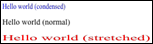
   $SVG:=SVG_New
   $textID:=SVG_New_text ($SVG;"Hello world (condensed)";0;0;"";-1;-1;-1;"blue";0;1;0,8)
   $textID:=SVG_New_text ($SVG;"Hello world (normal)";0;24)
   $textID:=SVG_New_text ($SVG;"Hello world (stretched)";0;48;"";-1;-1;-1;"red";0;1;2)
See Also
SVG_New_textArea, SVG_New_tspan, SVG_New_vertical_text.
|
|
|
|
|
|
|
|
|