


|
|
|
|
|
|
|
|
|
version 11.3
SVG_New_textArea (parentSVGObject; text{; x{; y{; width{; height{; font{; size{; style{; alignment}}}}}}}})  SVG_Ref
| Parameter | Type | Description | |
| parentSVGObject | SVG_Ref | | Reference of parent element |
| text | Text | | Text to insert |
| x | Number | | Coordinate on X axis |
| y | Number | | Coordinate on Y axis |
| width | Number | | Width of text area |
| height | Number | | Height of text area |
| font | Alpha | | Font name |
| size | Integer | | Size of characters in points |
| style | Integer | | Style of characters |
| alignment | Integer | | Alignment |
| Function result | SVG_Ref |  | Reference of SVG text object |
Description
The SVG_New_textArea command inserts a text area in the SVG container designated by parentSVGObject and returns its reference. If parentSVGObject is not an SVG document, an error is generated.
The "textArea" element is recommended by the SVG tiny 1.2 standard and implemented in 4D v11 SQL beginning with version 11.3 (see http://www.w3.org/TR/SVGMobile12/text.html#TextAreaElement). This element implements a text area that, unlike the "text" element, automatically handles the line feed when the text exceeds the width requested.
The optional x and y parameters can be used to specify the position on the X and Y axes of the top left corner of the area.
The optional width and height parameters specify the size of the area in the user coordinate space. If one or the other of these parameters is not provided, the text area will automatically be fitted to its contents.
The optional font and size parameters can be usd to specify the font and size, in points, to be used. When these parameters are not passed, the text will be written in Times New Roman 12 pt.
The optional style parameter gives information about the character style used. In the style parameter, you must pass one of the following values or a combination of several of them:
| 0 = Plain | |
| 1 = Bold | |
| 2 = Italic | |
| 4 = Underline | |
| 8 = Strikethrough |
The optional alignment parameter can be used to set the type of alignment to be applied to the drawn text. You can pass one of the following values:
| 1 = Align default (left) | |
| 2 = Align left | |
| 3 = Center | |
| 4 = Align right | |
| 5 = Justify |
Example
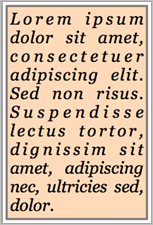
   $svg:=SVG_New
      `Position a border rectangle
   $rec:=SVG_New_rect ($svg;5;5;210;320;0;0;"#777";"peachpuff";3)
      `The text
   $txt:="Lorem ipsum dolor sit amet, consectetuer adipiscing elit. Sed non risus. Suspendisse lectus tortor, dignissim sit amet, adipiscing nec, ultricies sed, dolor."
   $txtArea:=SVG_New_textArea ($svg;$txt;10;10;200;310;"Georgia";25;Italic ;5)
      `Save document
   SVG_SAVE_AS_TEXT ($svg;"test.svg")
See Also
SVG_New_text, SVG_New_vertical_text.
|
|
|
|
|
|
|
|
|