


|
|
|
|
|
|
|
|
|
version 11.3
SVG_SET_MARKER (svgObject; url{; position})
| Parameter | Type | Description | |
| svgObject | SVG_Ref |  | Reference of SVG element |
| url | String | | Name of marker |
| position | String | | Position of marker |
Description
The SVG_SET_MARKER command can be used to associate a marker with the object having the svgObject reference. If svgObject is not the reference of a 'line', 'path', 'polyline' or 'polygon' element, an error is generated. If the attribute already exists, its value is replaced.
The url parameter is the name of the marker element to be used as specified by the SVG_Define_marker command. If this name does not exist, an error is generated.
The optional position parameter can be used to set the position of the marker with respect to the object. It is possible to place different markers (if desired) at the beginning, end or any other peak of a path. The values may be as follows:
• start to place a marker at the begining of the path
• end to place a marker at the end of the path
• middle to place a marker at each peak other than at the beginning and end.
• all to place markers at all peaks of the path.
If this parameter is omitted, the marker will be placed at the end of the path.
Examples
1. Draw an arrow:
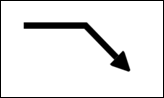
   $SVG:= SVG_New
      `Set the arrow
   $arrow:=SVG_Define_marker  ($SVG;"arrow";0;5;4;3;-1)
   SVG_SET_VIEWBOX ($arrow;0;0;10;10)
   $path:=SVG_New_path ($arrow;0;0)
   SVG_SET_FILL_BRUSH ($path;"black")
   SVG_PATH_LINE_TO ($path;10;5)
   SVG_PATH_LINE_TO ($path;0;10)
   SVG_PATH_CLOSE ($path)

   $line:=SVG_New_path ($SVG;100;75)
   SVG_SET_STROKE_WIDTH ($line;10)
   SVG_PATH_LINE_TO ($line;200;75)
   SVG_PATH_LINE_TO ($line;250;125)
      `Put an arrow at the end of a path
   SVG_SET_MARKER ($line;" arrow ")
2. Draw a diagram with different markers at the beginning and end:
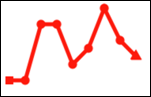
   $SVG:= SVG_New
   SVG_SET_DEFAULT_BRUSHES ("red";"red")

      `Set a circle to mark the points
   $point:=SVG_Define_marker  ($SVG;"pointMarker";2;2;3;3)
   SVG_SET_VIEWBOX ($point;0;0;4;4)
   SVG_New_circle ($point;2;2;1)

      `Set a square for the starting point
   $start:=SVG_Define_marker  ($SVG;"startMarker";1;1;2;2)
   SVG_New_rect ($start;0;0;2;2)

      `Set a triangle for the end point
   $end:=SVG_Define_marker  ($SVG;"endMarker";5;5;3;3;60)
   SVG_SET_VIEWBOX ($end;0;0;10;10)
   SVG_New_regular_polygon ($end;10;3)

   ARRAY LONGINT($tX;0)
   ARRAY LONGINT($tY;0)
      `X axis
   For ($Lon_i;0;200;20)
      APPEND TO ARRAY($tX;$Lon_i+10)
   End for
      `Data
   APPEND TO ARRAY($tY;100)
   APPEND TO ARRAY($tY;100)
   APPEND TO ARRAY($tY;30)
   APPEND TO ARRAY($tY;30)
   APPEND TO ARRAY($tY;80)
   APPEND TO ARRAY($tY;60)
   APPEND TO ARRAY($tY;10)
   APPEND TO ARRAY$tY;40)
   APPEND TO ARRAY($tY;50)
   APPEND TO ARRAY($tY;70)
   $line:=SVG_New_polyline_by_arrays ($SVG;->$tX;->$tY;"red";"none";5)
      `Arrange the markers:
   SVG_SET_MARKER ($line;"startMarker";"start")
   SVG_SET_MARKER ($line;"pointMarker";"middle")
   SVG_SET_MARKER ($line;"endMarker";"end")
See Also
|
|
|
|
|
|
|
|
|