


|
|
|
|
|
|
|
|
|
version 11.3
SVG_SET_DEFAULT_BRUSHES (line{; background})
| Parameter | Type | Description | |
| line | String |  | Color |
| background | String | | Color |
Description
The SVG_SET_DEFAULT_BRUSHES command can be used to set the default colors used by the component.
The line parameter contains the new color that will be used for lines. The optional background parameter contains the new color to be used for drawing backgrounds.
You can pass an empty string in either of these parameters in order to reset the default value of the component; in other words, black for the lines and white for the background.
Example
Like Mondrian…
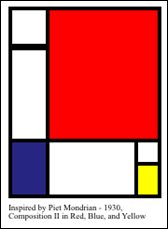
   $svg:=SVG_New
      `Set the default colors
   SVG_SET_DEFAULT_BRUSHES ("black";"white")
      `4-point thick lines
   SVG_SET_STROKE_WIDTH ($svg;4)
   $g:=SVG_New_group ($svg)
   SVG_New_rect ($g;2;2;40;40)
   SVG_New_rect ($g;2;45;40;100)
   SVG_SET_FILL_BRUSH (SVG_New_rect ($g;2;144;40;60);"midnightblue")
   SVG_SET_FILL_BRUSH (SVG_New_rect ($g;42;2;120;142);"red")
   SVG_New_rect ($g;42;144;95;60)
   SVG_New_rect ($g;137;144;25;25)
   SVG_SET_FILL_BRUSH (SVG_New_rect ($g;137;169;25;35);"yellow")
   SVG_SET_TRANSFORM_TRANSLATE ($g;10;10)
      `Caption
   SVG_New_text ($svg;"Inspired by Piet Mondrian - 1930,\rComposition II in Red, Blue, and Yellow";10;220;"";9)
See Also
SVG_GET_DEFAULT_BRUSHES, SVG_SET_STROKE_BRUSH.
|
|
|
|
|
|
|
|
|