


|
|
|
|
|
|
|
|
|
version 2004 (Modified)
In this section, you will design two methods and a custom menu bar. In short, you are going to create a custom 4D application.
Adding the Two Methods
1. Return to the Design environment by choosing Design from the Mode menu.
2. Select New > Method.. from the File menu.
The New Method dialog box appears.
3. Enter "M_ADD_RECORDS" in the New Method dialog box, then click OK.
A method editor window appears titled "Method:M_ADD_RECORDS".
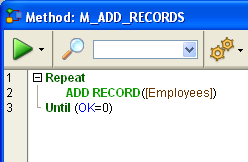
4. Enter the code of the M_ADD_RECORDS method as shown:
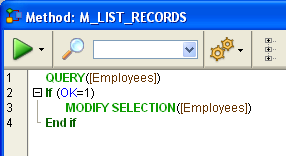
5. Create a second method named "M_LIST_RECORDS" with the following code:
Now that the two methods have been created, you will create a custom menu bar and attach the methods to custom menu commands.
Adding a Custom Menu Bar
1. Select Tool Box > Menus from the Design menu.
The Menu Bar Editor appears containing a default menu bar.
2. Go to the end of the list of existing menus (click on the "Mode" menu) and choose the Add Menu command in the lower part of the window.

3. Enter "Tutorial" as the menu title and press Enter.
4. Choose Add Item to add a menu item to the "Tutorial" menu.
5. Enter "Add Records..." and press Enter.
6. Choose Add Item again to add a second menu command to the"Tutorial" menu.
7. Enter "Queries..." and press Enter.
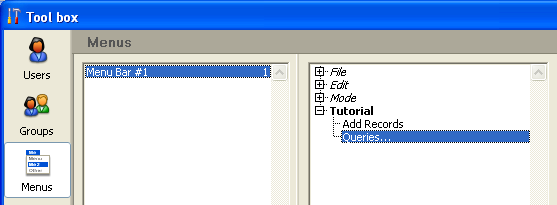
The menu bar #1 should look like this:
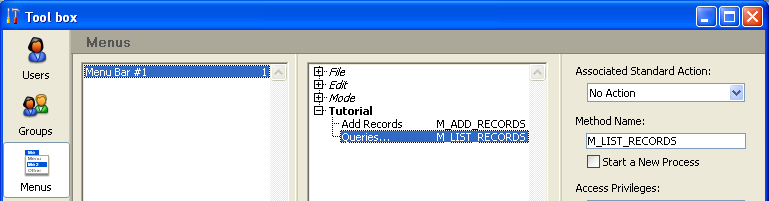
8. Click the "Add Records..." menu command and enter "M_ADD_RECORDS" in the Method Name area.
9. Click the "Queries..." menu command and enter "M_LIST_RECORDS" in the Method Name Area.
The menu bar #1 should now look like this:
10. Close the Tool box window.
You're done!
11. Select Custom Menus from the Mode menu.
You are now using your application with the menus you just designed:
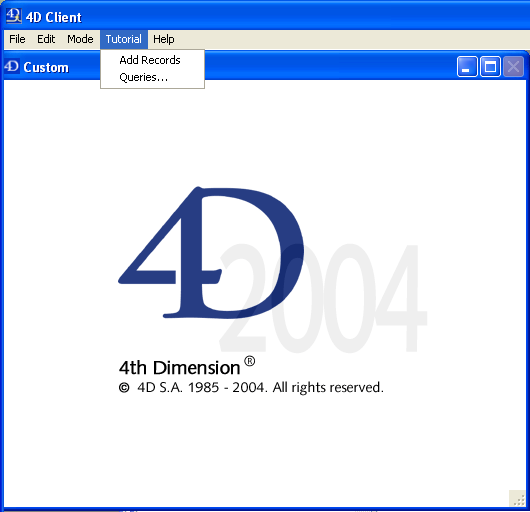
For example, if you select Queries... from the Tutorial menu, the Query editor (the built-in Query editor from the User environment) appears. You can define your query, then display and modify the records found by the query.
The interesting point is that, without knowing it, you just developed two applications!
To see why, go to the section Working Concurrently with 4D Server.
|
|
|
|
|
|
|
|
|