


|
|
|
|
|
|
|
|
|
version 11.3
SVG_Use (parentRef; id{; x; y; width; height{; mode}})  SVG_Ref
| Parameter | Type | Description | |
| parentSVGObjec | SVG_Ref | | Reference of parent element |
| id | String | | Name of symbol |
| x | Number | | X position of viewbox |
| y | Number | | Y position of viewbox |
| width | Number | | Width of viewbox |
| height | Number | | Height of viewbox |
| mode | String | | Adjustment to viewbox |
| Function result | SVG_Ref |  | SVG object reference |
Description
The SVG_Use command places an occurrence of the symbol in the SVG container designated by parentSVGObject and returns its reference. If parentSVGObject is not an SVG document or if id is not the object name of an SVG document, an error is generated.
A symbol is used to specify graphic objects; it is never rendered directly but may be instantiated using the SVG_Use command.
The id parameter specifies the name of the symbol.
The optional x, y, width and height parameters specify the viewbox rectangle ('viewBox' attribute).
The optional mode parameter can be used to indicate if the graphic must be fitted, and how so, to the size of the viewbox. (see the SVG_New command).
Example
Specify a graphic composed of two red circles and two blue squares. Then use this graphic in a loop to create 36 occurrences with varying positions, opacity and rotation of the original graphic.
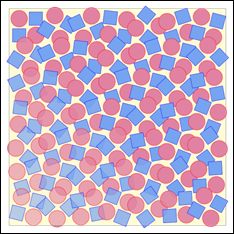
   $SVG:=SVG_New
      `Draw a background
   SVG_New_rect ($SVG;20;20;650;650;0;0;"gray";"lemonchiffon")
      `Specify a symbol composed of 2 squares and 2 circles
   $Symbol:=SVG_Define_symbol ($SVG;"MySymbol";0;0;110;110;"true")
   SVG_New_circle ($Symbol;30;30;25;"red";"palevioletred")
   SVG_New_rect ($Symbol;10;60;40;40;0;0;"blue";"cornflowerblue")
   SVG_New_rect ($Symbol;60;10;40;40;0;0;"blue";"cornflowerblue")
   SVG_New_circle ($Symbol;80;80;25;"red";"palevioletred")
      `In a group…
   $g:=SVG_New_group ($SVG)
      `…positioned 20 units from the top left corner of the document…
   SVG_SET_TRANSFORM_TRANSLATE ($g;20;20)
      `…place 36 patterns by varying the position, opacity and rotation
   For ($x;0;540;90)  `6 columns
      For ($y;0;540;90)   `6 rows
         $use:=SVG_Use ($g;"MySymbol";$x;$y;110;110)
         SVG_SET_OPACITY ($use;100-($y/12)+($x/12)
         SVG_SET_TRANSFORM_ROTATE ($use;($x*(18/50))+($y*(18/50));($x+55);($y+55))
      End for
   End for
See Also
|
|
|
|
|
|
|
|
|