


|
|
|
|
|
|
|
|
|
version 11.3
SVG_SET_OPTIONS {(options)}
| Parameter | Type | Description | |
| options | Longint |  | 4D SVG component options |
Description
The SVG_SET_OPTIONS command can be used to set the options of the 4D SVG component with the options longint. For more information about the contents of options, please refer to the description of the SVG_Get_options command.
Since all options will be set at once, this command must have been preceded with a call to the SVG_Get_options command, followed by the use of the Bitwise Operators of 4D.
If the options parameter is not passed, all the options are reset to their default value (see the SVG_Get_options command).
Examples
1. Create readable code:
   $Options := SVG_Get_options
   $Options := $Options ?+ 5 `enable the option
   SVG_SET_OPTIONS ($Options)
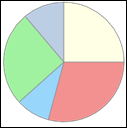
2. Draw a pie chart diagram:
   $svg:=SVG_New

      `Enable automatic closing of objects
   SVG_SET_OPTIONS (SVG_Get_options  ?+ 2)

   SVG_New_arc ($svg;100;100;90;0;105;"gray";"lightcoral";1)
   SVG_New_arc ($svg;100;100;90;105;138;"gray";"lightskyblue";1)
   SVG_New_arc ($svg;100;100;90;138;230;"gray";"lightgreen";1)
   SVG_New_arc ($svg;100;100;90;230;270;"gray";"lightsteelblue";1)
   SVG_New_arc ($svg;100;100;90;270;360;"gray";"lightyellow";1)
See Also
|
|
|
|
|
|
|
|
|