


|
|
|
|
|
|
|
|
|
version 1
CT PRINT MERGE (area; table; cancellable; printDialog)
| Parameter | Type | Description | |
| area | Longint |  | 4D Chart area |
| table | Integer | | Table number |
| cancellable | Integer | | Allow printing to be cancelled? |
| 0 = Do not allow cancelling | |||
| 1 = Allow cancelling | |||
| printDialog | Integer | | Present Print dialog box? |
| 0 = Without dialog box | |||
| 1 = With dialog box |
Description
The CT PRINT MERGE command allows you to perform a print merge for the current selection of the fileNum file. The document used for the print merge is specified by area.
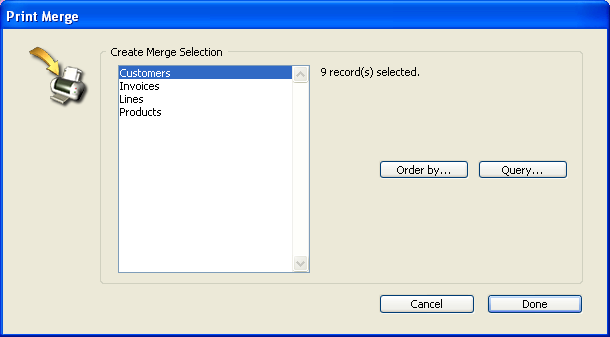
If table equals 0, the Create Merge Selection dialog box is displayed.
If cancellable equals 1, a dialog box appears, allowing you to cancel the printing in progress by pressing Command-period (Macintosh) or Ctrl-period (Windows) . If the user cancels the print job, CT Error returns error number 20. If cancellable equals 0, this dialog box does not appear, and the user cannot cancel the print job.
printDialog determines whether or not the standard Print dialog box appears. If printDialog equals 0, the standard Print File dialog box does not appear and the print job begins immediately. If printDialog equals 1, the standard Print File dialog box appears.
Example
This example ensures that the 4D Chart area is set to Show Values mode and performs a print merge:
       `Generate selection for print merge
   ALL RECORDS([MyFile])
       `Ensure that display mode is set to Show Values
   CT MENU STATUS (Area;6006;$Checked;$Available;$Name)

   If ($Name="Show Values")
      CT DO COMMAND (Area;6006)   `Set display to Show Values mode
   End if

       `Perform the print merge with no user intervention
   CT PRINT MERGE (Area;File(->[MyFile]);0;0)
See Also
|
|
|
|
|
|
|
|
|