


|
|
|
|
|
|
|
|
|
|
version 6.8
PV SET RANGE BORDER (area; left; top; right; bottom)
| Parameter | Type | Description | |
| area | Longint |  | 4D View area |
| left | Longint | | Left cell column number |
| top | Longint | | Top cell row number |
| right | Longint | | Right cell column number |
| bottom | Longint | | Bottom cell row number |
Description
The PV SET RANGE BORDER command applies the border set using PV SET BORDER STYLE to the specified range of cells defined by the left, top, right, and bottom parameters:
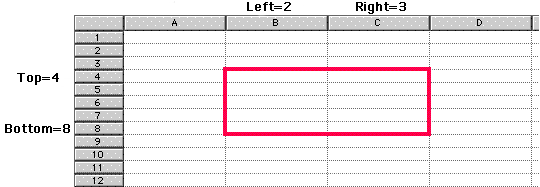
For more information on ranges, refer to the PV Selection, Introduction section.
Example
In a 4D View area, we want to trace a light blue horizontal double-line at the bottom of a table containing 12 rows entered in columns A and B:
   PV SET BORDER STYLE (Area;pv border edge top;pv border style 111;
                                    PV Index to color (Light blue))  `Border style and color
   PV SET RANGE BORDER (Area;1;12;2;12) `Underline the bottom of the range
See Also
|
|
|
|
|
|
|
|
|
|