


|
|
|
|
|
|
|
|
|
version 1
CT SET FILL ATTRIBUTES (area; scope; pattern; color)
| Parameter | Type | Description | |
| area | Longint |  | 4D Chart area |
| scope | Longint | | Scope of the command |
| -2 = Default | |||
| -1 = All | |||
| 0 = Selected objects | |||
| >0 = Object ID | |||
| pattern | Integer | | Pattern (0 to 36) |
| -1 = No change | |||
| color | Longint | | Color value |
| -1 = No change |
Description
The CT SET FILL ATTRIBUTES command changes the fill attributes for the object(s) in area described by scope. Fill attributes are determined by the interiors of objects.
pattern is the number of the pattern in the palette. The following are the codes for the pattern parameter:
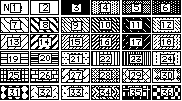
color is a long integer that specifies the color of the object. You can specify a value for the color parameter by using the CT Index to color or the CT RGB to color functions.
Note: Use this command to set the attributes of objects added to the document using the drawing tools or the drawing functions in this theme. To get the attributes of chart objects, such as series columns, use the commands in the Chart theme.
Example
This example sets the selected object's fill attributes to solid yellow.
CT SET FILL ATTRIBUTES (Area;0;3;CT Index to color (2))
See Also
CT GET FILL ATTRIBUTES, CT SET CHART FILL ATTRIBUTES, CT SET FILLS ATTRIBUTES.
|
|
|
|
|
|
|
|
|